Your Consultative Signs and Graphics Partner for Eastside Businesses


Signs That Help Customers Feel Smart and Confident in Stores
Oct 21, 2026 by Signarama Redmond

Clear signs can turn a confusing choice into a confident one. Signs that help customers feel smart and confident explain available options, make prices and key details easier to compare, and set clear expectations. According to Gartner, customers who are confident in their decision-making are 2.6 times more likely to purchase more.
Customers want to understand what they’re choosing without feeling rushed or uncertain. When information is hard to find or unclear, even a good selection can feel difficult to navigate. Helpful signs offer useful context when shoppers need it, while leaving room to ask for assistance.
This article explores how clear wording, thoughtful placement, and useful details can support better in-store decisions. You’ll learn what information helps customers compare options, how signs can reduce uncertainty and set expectations, and what makes a message easier to notice and understand. The result is a more welcoming shopping experience where people can make choices with greater confidence.
Key Takeaways
Make choices easier by presenting options and key details in clear, easy-to-scan language.
Set expectations with signs that explain what shoppers can expect before they reach a decision point.
Use wayfinding messages to help customers find products and move through the store with less uncertainty.
Make pricing information straightforward so shoppers can compare options and understand their choices.
Review signs from a customer’s perspective to spot gaps, confusing wording, or details that are hard to find.
Table of Contents
How does clear wayfinding signage improve customer confidence?
How can pricing signs make customers feel informed and confident?
Clear communication and explaining options
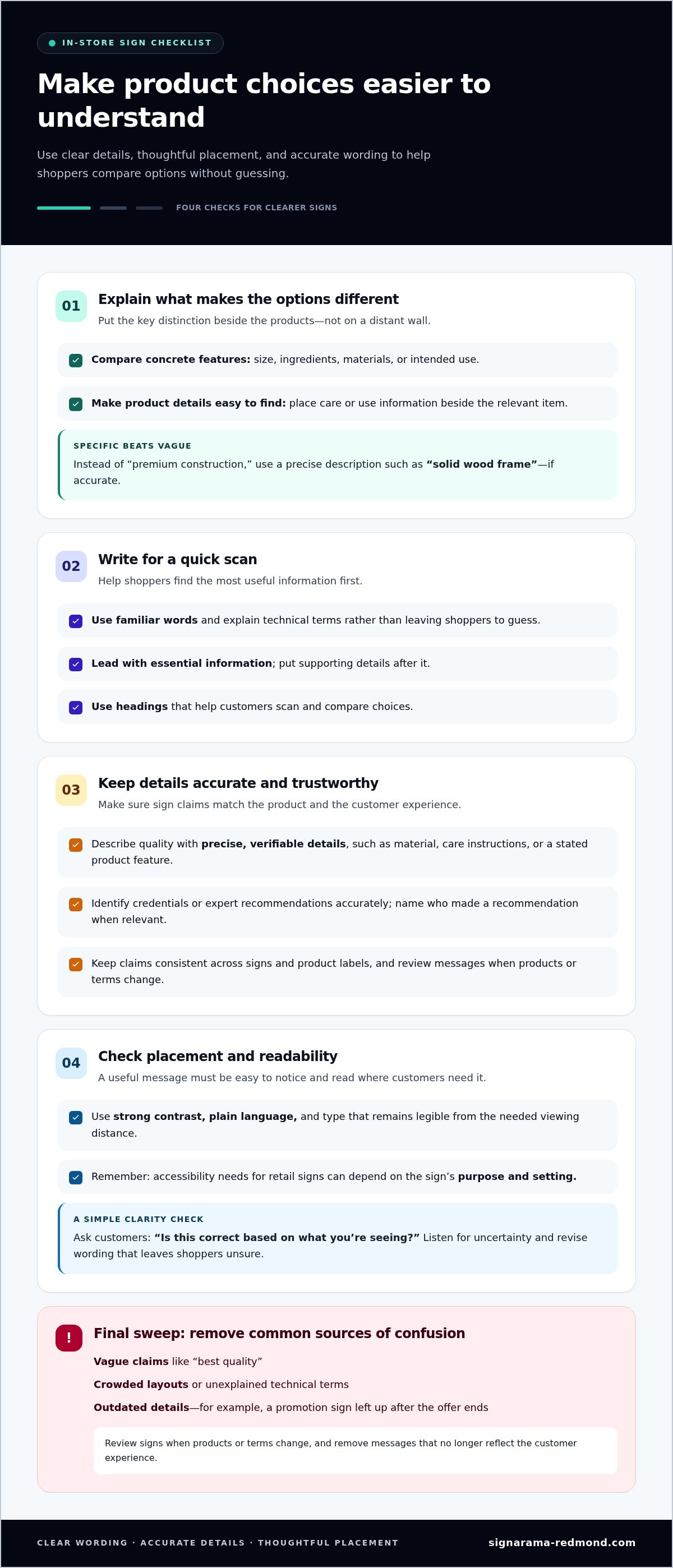
Well-designed signs that help customers feel smart and confident answer practical questions before shoppers need to ask. A sign beside similar products can explain differences in size, ingredients, materials, or intended use. Place the key distinction close to the options, not on a distant wall. Clear language helps customers compare without guessing, and focused details make each choice easier to understand.
Use familiar words. For example, replace “premium construction” with a specific description such as “solid wood frame,” if accurate. Put essential information first and supporting details second, so shoppers can scan quickly. Staff can listen for repeated questions and revise wording that leaves customers uncertain. Clear signs can also help staff address common misunderstandings.
For retail signs in the United States, accessibility needs can depend on a sign’s purpose and setting. For practical readability, use strong contrast, plain language, and type that remains legible from the distance where customers need the information.
Describe product quality with precise, verifiable details, such as material, care instructions, or a stated product feature. Identify credentials or expert recommendations accurately, and name who made a recommendation when that context helps shoppers judge its relevance.
Signs also shape how customers feel. Someone unsure about a product may feel more at ease when a nearby message explains how the options differ. Pair clear wording with a respectful tone, and avoid implying that shoppers should already know the answer. This can also help staff acknowledge customers’ concerns during conversations.
Useful signs often:
Explain one product difference with a specific example.
Place care or use details beside the relevant item.
Use headings that help customers scan choices.
Keep claims consistent across signs and product labels.
Common mistakes include vague claims like “best quality,” crowded layouts, unexplained technical terms, and outdated details. They can make customers question whether the information is complete or trustworthy. For example, a promotion sign left up after an offer ends creates confusion at checkout. Review signs when products or terms change, and remove messages that no longer reflect the customer experience.
To see whether signs explain options clearly, ask customers how easy the choices were to understand. A brief question such as “Is this correct based on what you’re seeing?” can help staff catch misunderstandings. Listen to the answer and adjust the explanation. Clear language, accurate details, and thoughtful placement help customers decide with confidence.
Customer service teams can assess communication clarity by asking customers how clearly the representative explained their options. Representatives can check whether they understood a customer’s situation by asking, “Is this correct based on what you’re seeing?” When a customer is upset about an unavoidable delay, acknowledge the wait and briefly explain why delays can happen. This validates the customer’s frustration and leaves room to clarify what they have heard. Keep the explanation of options clear.
Customer experience and customer expectations
Customer experience is shaped by what shoppers expect and what they encounter in the store. In customer-service research, 80% of customers said they had switched brands because of poor customer experience, and 43% switched after a single negative experience. Signs can help set expectations before small uncertainties become frustrating interactions. For example, a clear notice explaining where to join a queue gives customers a practical next step when staff are busy.
Expectations include more than product details. Shoppers also need to know where to go, what happens next, and where to find help. A fitting-room sign can explain where to leave unwanted items. A returns sign can direct customers to the service desk and summarize the process in plain language. These messages don’t replace conversations with staff. They provide context upfront, so staff can focus on questions that need personal attention.
Customers value continuity across different kinds of service. Salesforce Research reports that 35% of customers would prefer working with an AI agency rather than a human representative if it meant they didn’t have to repeat themselves. In a store, consistent wording across signs, product information, and staff conversations can reduce repeated explanations. For example, a sign and an employee should give the same directions for finding a product section.
Empathy matters when expectations aren’t met. If a service point is temporarily closed, a bare “closed” notice leaves customers unsure what to do. A more useful sign briefly explains the situation and directs shoppers to an available alternative. This respects their time and supports constructive conversations. Staff can then acknowledge a customer’s concern and clearly explain the next step.
Show customers where to go, such as the queue entrance or help desk.
Explain what to expect, using a fitting-room or pickup example.
Keep directions consistent across signs and staff conversations.
When plans change, state the next available option.
To assess whether signs support the intended experience, gather feedback about specific moments. Ask whether customers could find the service desk, understand pickup, or locate an alternative during a closure. Pair a rating with an open-ended prompt such as “What was unclear?” Responses can reveal whether confusion came from missing directions, unfamiliar wording, or a gap between the sign and the actual service.
Review these messages as store layouts and processes change. A sign that points to a relocated counter can undermine trust, even if its wording is simple. A short practice review can help staff notice outdated directions and reflect on questions customers keep asking. For a coordinated approach to store messaging, explore retail sign planning.
Customer confidence and purchase decisions
Customers make more confident decisions when store information answers practical questions at the point of choice. Clear signs can help shoppers compare options, understand next steps, and act without unnecessary guesswork.
Confidence in purchase decisions
Purchase confidence means feeling able to choose based on information that makes sense. Gartner research finds that customers confident in their decision-making are 2.6 times more likely to purchase more. For a shopper comparing two products, clear details about materials or intended use can make the difference easier to assess. The goal is not to push a choice, but to help customers understand it.
Wayfinding that builds confidence
Wayfinding signs show customers where to go and what to expect. Shoppers looking for a particular department can follow consistent directions instead of interrupting their shopping to ask for help. Focus each message on one action, such as “Checkout” or “Customer support.” Clear routes matter especially when shoppers need help, want to make a return, or are looking for a particular product area.
Confidence also depends on whether a sign answers the question customers actually have. A display beside similar products might explain how the options differ. For example, “Unscented” and “Lightly scented” give shoppers a useful distinction. Broad claims like “great choice” offer little decision support. Specific information helps customers evaluate options on their own terms.
Signs can also make the next action clear. A promotion may explain which products it applies to, while a pickup notice can direct customers to the right counter. If a shopper encounters a problem, a visible direction to customer support can reduce frustration and give them a starting point before the issue escalates.
Place decision details beside the products they describe.
Use consistent terms for the same department or service.
Give one clear action when customers need help.
Remove messages that conflict with current store practices.
Use customer questions to assess sign clarity. If shoppers repeatedly ask whether a promotion applies to an item, make the terms easier to find. If customers ask where to take a return, improve the route or the message directing them. Everyday conversations can reveal what information is missing.
Customer support still matters when signs can’t resolve a concern. Staff can listen, acknowledge the issue, and explain the next step. A sign that identifies the support point clearly helps customers reach that conversation sooner. Review the experience from the shopper’s perspective: can they locate the product, compare relevant details, and find help without searching through multiple messages?
How does clear wayfinding signage improve customer confidence?
Clear wayfinding gives shoppers a reliable route through a store, so they can focus on finding what they need. Someone looking for a particular department can follow consistent directions instead of stopping repeatedly to ask for help. Each sign should confirm the next step and match the place it describes.
Consider the journey from entrance to checkout. An entrance directory can identify departments, while aisle markers help shoppers narrow their search. A sign pointing toward customer service can show where to go with a question about a purchase. Consistent department names help customers connect directions and stay oriented.
Place directions where people make decisions. At a corridor split, name the destinations along each route instead of simply saying “This way.” Near an elevator, identify the floor and the departments there. These details reduce backtracking and help customers choose a route before reaching a dead end.
Use a clear information hierarchy. Make the main destination stand out, with supporting details beneath it. For example, a sign might show “Checkout” prominently, then indicate the nearest route. Keep wording brief and avoid competing messages. If a sign lists every store feature, customers may struggle to find the destination they need.
Use the same name for a destination throughout the store.
Place directional signs before a turn or route choice.
Pair words with familiar symbols when they clarify the message.
Remove signs that point to changed or closed areas.
Consider shoppers with different needs and levels of familiarity. A first-time visitor may not know that “fulfillment” means order pickup, so “Order Pickup” is more direct. Someone carrying bags may need a clear route to the exit. Strong contrast and readable type help people scan directions without stopping close to every sign.
Review the route from a customer’s point of view. Start at the entrance and follow signs to a destination, such as the fitting rooms or returns desk. Note each point where the next step becomes unclear. If a customer has to guess in a hallway or double back, add a directional cue before that decision point.
Wayfinding also shapes how customers respond when plans change. If a department moves, a temporary notice can name its new location and show the route. A bare “closed” message leaves shoppers without an answer. Clear updates help people adapt, keep their visit moving, and maintain confidence in the store’s directions.
How can pricing signs make customers feel informed and confident?
Pricing signs help shoppers understand the cost of an option before choosing it. A clear sign connects the price to the product, package, or service being considered. For example, place a shelf label beside the item it describes, not between similar products. That simple choice helps customers compare accurately and reduces uncertainty at the point of decision.
Gartner research indicates that providing customers with the right information through the right channels can boost buying confidence by 400%. In a store, the right channel may be a shelf label, a display card, or a sign near a service counter. The useful information depends on the choice: a price, what it applies to, and any distinction shoppers need to understand before comparing options.
Create a clear visual order. Make the price easy to spot, then add brief context beside it. If a package contains several items, identify which package the price covers. If products come in different sizes, visually tie each price to its size. Consistent placement across a display helps customers scan without confusing one option with another.
Promotions need especially clear wording. A sign that says “special offer” without identifying the eligible product can leave shoppers guessing. Name the product or group, and present relevant conditions in readable language. For example, distinguish an offer on a single item from one connected to a bundle. Keep the sign consistent with the products beneath it.
Comparison signs can help shoppers assess value without pressure. Group comparable choices and clarify the basis of comparison, such as package size or included features. Avoid grouping unlike options under one heading. If a product differs in quantity or format, identify that difference so customers can compare fairly.
Common mistakes include placing a sign too far from its product, using tiny supporting text, and leaving an old promotion on display. These details can make customers question which price or offer applies. Review signs whenever a display changes, and make sure each message matches the item directly below it. Clear, current information gives shoppers a dependable basis for deciding.
Place each price beside the exact product or package.
State what an offer applies to in plain language.
Keep comparable options together and clarify their differences.
Remove outdated messages when products or displays change.
Review your pricing displays across the full shopping journey, from shelf to checkout. If customers often ask which offer applies, revise the wording or placement. To create clear, customer-focused pricing signs for your store, plan each message around the decision shoppers need to make.
Signarama: Signs
Signarama Redmond creates signs and graphics that help make store information easier to see and understand. If customers struggle to find departments, compare options, or understand a displayed price, consider how signs could clarify those moments. Start by identifying the message shoppers need, where they make the decision, and which details should stand out. That gives your store a focused direction for communicating choices and setting expectations.
Clear, consistent signs can support a more confident shopping experience, from the entrance to the point of purchase. Bring your goals for customer communication and the areas you want to improve into the conversation. Contact Signarama to discuss signs and graphics for your store.
Make the next store visit easier to navigate
Take a fresh look at your store from a shopper’s perspective. Notice where customers pause, double back, or search for help. Those moments can point to opportunities for clearer visual communication. Choose one area to improve first, such as the entrance, a product display, or a service counter, and identify the message customers need there.
Designing signs that help customers feel smart and confident means considering the whole experience, not just one message. Signarama Redmond provides signs and graphics to help businesses communicate with customers in their spaces. A focused conversation about your goals can help shape messaging that feels clear, useful, and consistent with how your store serves people.
Contact Signarama about your signs and take a practical step toward a more confident customer experience.
Frequently Asked Questions
What signs help customers feel smart and confident when making a purchase?
Signs that help customers feel smart and confident give them useful context without making the decision for them. For example, a gift display could group items by recipient or occasion, helping shoppers narrow a broad selection. A short note can explain what makes each group suitable. Keep recommendations specific and factual, so customers can use the guidance while choosing according to their own needs.
What product signs explain features, benefits, and comparisons clearly?
Product signs work best when they connect a feature to a practical benefit. For a reusable bottle, a sign might identify its material and explain that it is intended for repeated use, if accurate. A comparison can then distinguish available sizes or lid styles. Tie each description to the product it represents, and avoid claims the product details cannot support.
What are examples of signs that simplify choices without overwhelming customers?
A short “Staff picks” display with a clear reason for each selection can help shoppers start exploring. A category sign such as “Gifts for new homeowners” can also make a large assortment easier to browse. Limit each message to one purpose, and use a few well-chosen examples rather than listing every option. Customers can then explore at their own pace.
How should retailers use comparison charts and decision guides on signs?
Use a comparison chart when shoppers need to weigh the same attributes across similar products. Give each option its own column and compare consistent details, such as material, size, or included components. A decision guide can start with a practical need, such as “Choose a compact option for small spaces.” Keep claims accurate and the layout readable, so the guide supports decisions without making unsupported recommendations.

Signarama Redmond, WA
Summer Hours (July - August) - MON-THUR: 8.00AM - 6.30PM, FRI - SUN: CLOSED
contact
Signarama Redmond, WA