

Camera resoutions and how to choose the right one
Mar 8, 2024 by Moothedath Ramachandran
Item 1 of 4
Resolution:
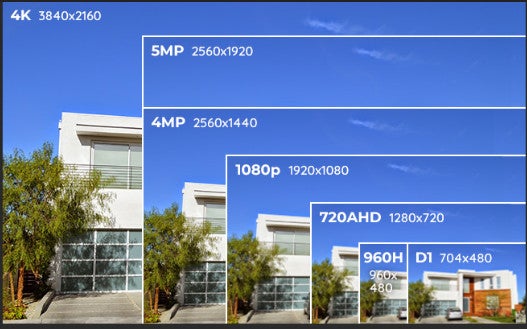
Look for cameras with high resolution (measured in megapixels) for clearer images.
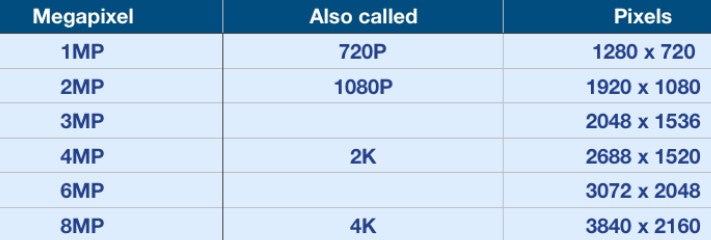
A minimum of 1080p (2MP) is recommended for basic surveillance, but higher resolutions like 4K provide more detail.
Field of View (FOV):
Consider the camera's field of view, which determines the area it can cover. A wider FOV may require fewer cameras for comprehensive coverage.
Night Vision:
Opt for cameras with infrared (IR) or low-light capabilities for effective monitoring during nighttime.
Check the camera's night vision range, and choose one that suits the size of the area you want to cover.
Weather Resistance:
Ensure the camera is designed for outdoor use and has an appropriate Ingress Protection (IP) rating, indicating its resistance to dust and water.
Look for cameras with a durable housing that can withstand various weather conditions.
Power Source:
Consider how the camera will be powered. Options include wired (power over Ethernet - PoE) or wireless (battery-powered or solar-powered). Wired cameras are more reliable but may require professional installation.
Motion Detection and Alerts:
Choose a camera with motion detection capabilities to minimize unnecessary recording.
Look for models that can send alerts or notifications to your smartphone or email when motion is detected.
Storage Options:
Decide between local storage (onboard SD card) and cloud storage. Local storage can be more secure but may have limitations, while cloud storage offers remote access but may have subscription costs.
Two-Way Audio:
Some cameras come with built-in microphones and speakers, allowing for two-way communication. This can be useful for monitoring and interacting with people on your property.
Remote Viewing:
Ensure the camera is compatible with your preferred viewing platform, whether it's a dedicated app, web browser, or third-party software.
Integration with Smart Home Systems:
Check if the camera is compatible with popular smart home platforms like Google Home or Amazon Alexa.
Budget:
Establish a budget for your surveillance system and find a camera that meets your requirements within that budget.
Brand Reputation:
Consider reputable brands with a history of reliability and positive customer reviews.
Before making a purchase, it's advisable to read reviews, compare specifications, and perhaps consult with professionals to ensure the chosen camera meets your specific security needs.
User
what are the resoutions of outdoor cameras and how to choose the right reolution
ChatGPT
Outdoor surveillance cameras come in various resolutions, and the right choice depends on your specific needs and preferences. Here are some common resolutions for outdoor cameras and guidance on choosing the right one:
720p (1MP):
Basic resolution suitable for general monitoring.
Cost-effective option for smaller areas with less need for detailed image quality.
1080p (2MP):
Standard resolution for most applications.
Provides clearer images and better detail than 720p.
Suitable for general outdoor surveillance.
1440p (4MP) and 1520p (5MP):
Offers higher resolution and more detail than 1080p.
Suitable for larger areas or locations where finer details are important.
4K (8MP) and above:
High-resolution cameras providing excellent detail.
Ideal for large areas, critical surveillance points, or locations where intricate details are crucial.
Choosing the Right Resolution:
Consider Purpose:
For general monitoring of entrances or small areas, 1080p may suffice.
For larger properties or areas requiring more detail, consider 4MP, 5MP, or higher.
Balancing Storage and Detail:
Higher resolutions produce clearer images but require more storage space.
Consider your storage capabilities and choose a resolution that balances detail with storage needs.
Field of View:
A higher resolution allows for more digital zoom without losing clarity.
If you need to zoom in on specific areas, opt for a higher resolution.
Budget:
Higher resolution cameras tend to be more expensive.
Consider your budget constraints while balancing the need for resolution.
Bandwidth Considerations:
Higher resolutions may require more bandwidth for streaming and storage.
Ensure your network can handle the data load, especially if you have multiple cameras.
Future-Proofing:
Consider future developments and advancements in camera technology.
Investing in a higher resolution may provide better performance as technology evolves.
Test and Evaluate:
If possible, test cameras in the actual environment before making a decision.
Evaluate the clarity of images and whether the resolution meets your expectations.
Ultimately, the right resolution depends on your specific use case and preferences. Consider factors like the size of the area to be monitored, the level of detail required, and your budget constraints to choose the outdoor surveillance camera resolution that best suits your needs.
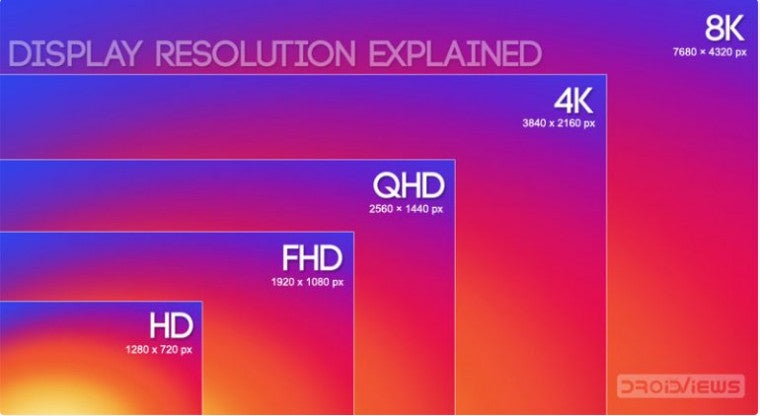
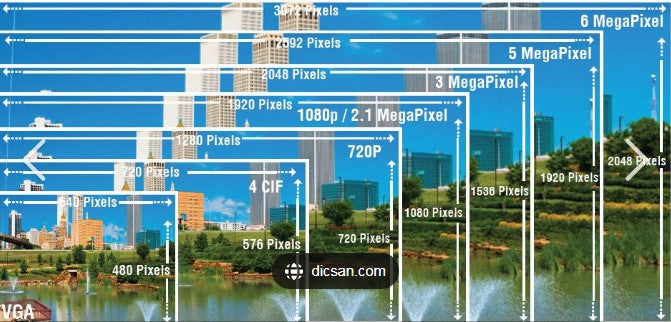
In terms of displays, HD refers to the resolution of the original HD TVs that first came around. There were a few, but the most basic was 1280 x 720 pixels, or more commonly called 720p. The ‘p’ is for progressive can as opposed to 720i, where the ‘i’ stands for interlaced. The difference between the ‘p’ and ‘i’ is a whole different topic so we won’t go over it here. These days though, especially when it comes to TVs, HD is not so HD anymore.
Full HD is the real HD, and displays with this resolution pack in about 2 million pixels. That’s twice as much as HD. Full HD measures at measures 1,920 x 1,080 pixels, often referred to as 1080p. Most basic TVs today are 1080p and that’s true for a huge number of smartphones as well.
qHD, QuadHD/WQHD/1440p, and 2K Resolutions
qHD, and QHD, while spelled pretty much the same couldn’t be any more different. qHD stands for a quarter of full HD, i.e., four times less than 1080p. The typical qHD resolution is 960 x 540 pixels or 540p. QHD, on the other hand, is four times the standard HD resolution. Keep in mind, four times the HD resolution, not Full HD. The typical QHD resolution is 2,560 x 1,440 pixels or 1440p. That’s four times as many pixels as 1280 x 720 or 720p.
If you’re counting, Quad HD or QHD contains 4 million pixels. As is the case with all HD derived resolutions, QHD also has an aspect ratio of 16:9 which is considered wide. For this reason, some manufacturers like to put a W in front, marketing it as WQHD. The W is there to explicitly state a wide aspect ratio, although it is essentially the same thing as QHD.
QHD displays are very common in Android flagship smartphones these days. QHD is also often referred to as 2K because it is half of 4K. But mostly, 2K refers to a resolution where the larger of the pixel measurements is over 2000 pixels. The typical 2K resolution is 2,048 × 1,080 pixels. So it’s basically a 1080p display but with a much wider aspect ratio. 2K is therefore not quite the same as QHD, and in fact, QHD is better.
Don’t Miss: PPI vs DPI: What are They & What’s the Difference?
4K and UHD Resolutions
Many of you may think 4K and UHD are one and the same and it isn’t your fault. Companies often use these interchangeably and together. Pick up any Blu-Ray Cover for 4K movie and it will most definitely also have the Ultra HD label. 4K is actually not a consumer display and broadcast standard, unlike UHD which is. 4K displays are used in professional production and digital cinemas and feature 4,096 x 2,160 pixels. That’s a wider aspect ratio than 16:9, much like 2K.
8K and 8K UHD Resolutions
All digital displays or images with a width or higher pixel value of approximately 8000 pixels have an 8K resolution. 8K resolution produces vivid colors and details. It’s said that at this level of resolution the human eyes cannot notice the pixels and the displayed images look very clear as no dots are visible to the eyes. As for 8K UHD resolution displays, they have an aspect ratio of 16:9 and have around 7680 × 4320 pixels.

Signarama Freehold, NJ
23 South Street
Freehold New Jersey 07728
Enter through Market Yard Parking lot
Opening Hours:
Monday
9:00 am - 5:30 pm
Tuesday
9:00 am - 5:30 pm
Wednesday
9:00 am - 5:30 pm
Thursday
9:00 am - 5:30 pm
Friday
9:00 am - 5:30 pm
contact
Signarama Freehold, NJ
CLIENTS WE HAVE WORKED WITH: