
5 Tips on designing files in Canva for print production
May 17, 2023 by Mallory Lynn
Item 1 of 1
If you are in a creative industry or in marketing, I am almost positive you have either heard of Canva.com or are currently using it. Canva is a miraculous tool that opens a lot of possibilities for people who are not designers and/or cannot afford to hire designers. There are stock videos, stock photos, gifs, video templates, sizing for any social media platform, presentations, business cards and the list goes on – all at your fingertips. However, in the sign industry, we have come across multiple situations where our clients (who are not trained designers) provide us with files for production that are from Canva. Unfortunately, many times the files did not work out for one reason or another.
5 Tips on designing files in Canva for print production
Pay for Premium
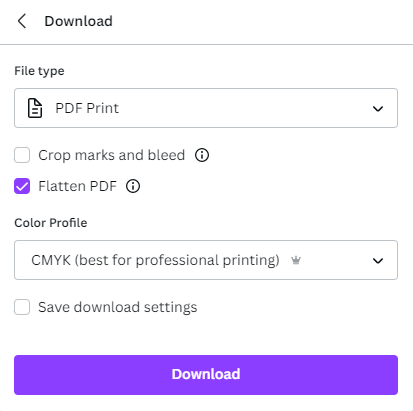
These may not be the words you want to hear, but you will be unable to export the right types of files that make beautifully printed pieces if you do not pay for premium. Canva makes it easy when you go to export and has an option that is “PDF” print. ALWAYS flatten your pdf and select “CMYK” under the color profile for professional printing. All of which is only offered in the premium version.
 Design to Size
This can be hard one as even in the premium version of Canva you are limited to a maximum of 83.328 inches and a minimum of .417in. We say design to size to receive the best quality possible out of photos and images, so this sizing can be very limiting in the sign world. The standard size for a common banner is 96in x 48in which you wouldn’t be able to achieve with Canva size restrictions.
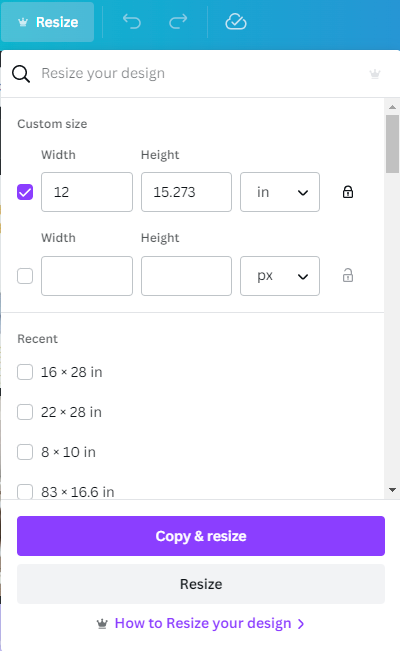
If you are going to design artwork that needs to be enlarged for print (sacrificing quality) make sure to make it the same ratio. This can be tricky, but with Canva premium it will do the math for you. When you go to resize make sure the “Lock” icon is selected. Check the box next to the size you are changing and put in the measurement you want to achieve for the width and it will automatically update the height to maintain the ratio. Canva has a whole tutorial on this as well.
Design to Size
This can be hard one as even in the premium version of Canva you are limited to a maximum of 83.328 inches and a minimum of .417in. We say design to size to receive the best quality possible out of photos and images, so this sizing can be very limiting in the sign world. The standard size for a common banner is 96in x 48in which you wouldn’t be able to achieve with Canva size restrictions.
If you are going to design artwork that needs to be enlarged for print (sacrificing quality) make sure to make it the same ratio. This can be tricky, but with Canva premium it will do the math for you. When you go to resize make sure the “Lock” icon is selected. Check the box next to the size you are changing and put in the measurement you want to achieve for the width and it will automatically update the height to maintain the ratio. Canva has a whole tutorial on this as well.
 Don’t Send us a link, we don’t want it
Many times we receive a link to view the artwork from our clients. This isn’t especially helpful as we still cannot download the artwork. The artwork will need to be downloaded and flattened into a separate pdf file for us to be able to work with it.
Want resizable artwork?
If you want to create artwork that is easily scalable, AVOID IMAGES. Images do not scale well and will lose quality quickly. Stick with text, Lines & Shapes, and Simple Graphic elements if you want to maintain resizability. Also, don’t flatten your pdf file before downloading it if you would like the artwork to be crisp on your signs. Canva also has logo templates. So, if you stick with these you will be well on your way!
When in doubt…
When in doubt, start with a Canva template. These are already laid out for legibility and intriguing design options. Many times we will receive artwork where a client has put skinny text on top of a very busy image which makes the sign impossible to read
We do have a team of expert designers that are highly trained on staff to help guide you in the best direction to get your vision across while getting the most bang for your buck. So utilize us! We are here for you and to help support your vision.
----------
Quick Summary: How to Use Canva for Professional Signage
Canva is a powerful tool for quick designs, but there is a big difference between a social media post and a large-format print. To ensure your Canva designs don't come out blurry or off-color, you need to follow specific export and layout rules to make your files "production-ready."
5 Tips for Canva Design Success:
-Go Premium for CMYK: Professional printing requires the CMYK color profile. This is only available in Canva Premium. Always select "PDF Print," flatten the PDF, and choose CMYK before exporting.
-Watch Your Ratios: Canva limits designs to roughly 83 inches. If you need a larger banner (like a standard 8' x 4'), design your file at the same aspect ratio and lock the dimensions to maintain quality when enlarged.
-Send Files, Not Links: Your sign company cannot manufacture from a "view-only" link. Always download and send a high-resolution, flattened PDF.
-Avoid Heavy Image Use: For crisp, scalable signs, stick to lines, shapes, and text. High-resolution photos are difficult to scale on large surfaces without losing clarity.
Stick to Templates: If you aren't a designer, use Canva’s pre-made templates to ensure your text remains legible and your layout stays balanced.
Don’t Send us a link, we don’t want it
Many times we receive a link to view the artwork from our clients. This isn’t especially helpful as we still cannot download the artwork. The artwork will need to be downloaded and flattened into a separate pdf file for us to be able to work with it.
Want resizable artwork?
If you want to create artwork that is easily scalable, AVOID IMAGES. Images do not scale well and will lose quality quickly. Stick with text, Lines & Shapes, and Simple Graphic elements if you want to maintain resizability. Also, don’t flatten your pdf file before downloading it if you would like the artwork to be crisp on your signs. Canva also has logo templates. So, if you stick with these you will be well on your way!
When in doubt…
When in doubt, start with a Canva template. These are already laid out for legibility and intriguing design options. Many times we will receive artwork where a client has put skinny text on top of a very busy image which makes the sign impossible to read
We do have a team of expert designers that are highly trained on staff to help guide you in the best direction to get your vision across while getting the most bang for your buck. So utilize us! We are here for you and to help support your vision.
----------
Quick Summary: How to Use Canva for Professional Signage
Canva is a powerful tool for quick designs, but there is a big difference between a social media post and a large-format print. To ensure your Canva designs don't come out blurry or off-color, you need to follow specific export and layout rules to make your files "production-ready."
5 Tips for Canva Design Success:
-Go Premium for CMYK: Professional printing requires the CMYK color profile. This is only available in Canva Premium. Always select "PDF Print," flatten the PDF, and choose CMYK before exporting.
-Watch Your Ratios: Canva limits designs to roughly 83 inches. If you need a larger banner (like a standard 8' x 4'), design your file at the same aspect ratio and lock the dimensions to maintain quality when enlarged.
-Send Files, Not Links: Your sign company cannot manufacture from a "view-only" link. Always download and send a high-resolution, flattened PDF.
-Avoid Heavy Image Use: For crisp, scalable signs, stick to lines, shapes, and text. High-resolution photos are difficult to scale on large surfaces without losing clarity.
Stick to Templates: If you aren't a designer, use Canva’s pre-made templates to ensure your text remains legible and your layout stays balanced.
Design to Size
This can be hard one as even in the premium version of Canva you are limited to a maximum of 83.328 inches and a minimum of .417in. We say design to size to receive the best quality possible out of photos and images, so this sizing can be very limiting in the sign world. The standard size for a common banner is 96in x 48in which you wouldn’t be able to achieve with Canva size restrictions.
If you are going to design artwork that needs to be enlarged for print (sacrificing quality) make sure to make it the same ratio. This can be tricky, but with Canva premium it will do the math for you. When you go to resize make sure the “Lock” icon is selected. Check the box next to the size you are changing and put in the measurement you want to achieve for the width and it will automatically update the height to maintain the ratio. Canva has a whole tutorial on this as well.
Don’t Send us a link, we don’t want it
Many times we receive a link to view the artwork from our clients. This isn’t especially helpful as we still cannot download the artwork. The artwork will need to be downloaded and flattened into a separate pdf file for us to be able to work with it.
Want resizable artwork?
If you want to create artwork that is easily scalable, AVOID IMAGES. Images do not scale well and will lose quality quickly. Stick with text, Lines & Shapes, and Simple Graphic elements if you want to maintain resizability. Also, don’t flatten your pdf file before downloading it if you would like the artwork to be crisp on your signs. Canva also has logo templates. So, if you stick with these you will be well on your way!
When in doubt…
When in doubt, start with a Canva template. These are already laid out for legibility and intriguing design options. Many times we will receive artwork where a client has put skinny text on top of a very busy image which makes the sign impossible to read
We do have a team of expert designers that are highly trained on staff to help guide you in the best direction to get your vision across while getting the most bang for your buck. So utilize us! We are here for you and to help support your vision.
----------
Quick Summary: How to Use Canva for Professional Signage
Canva is a powerful tool for quick designs, but there is a big difference between a social media post and a large-format print. To ensure your Canva designs don't come out blurry or off-color, you need to follow specific export and layout rules to make your files "production-ready."
5 Tips for Canva Design Success:
-Go Premium for CMYK: Professional printing requires the CMYK color profile. This is only available in Canva Premium. Always select "PDF Print," flatten the PDF, and choose CMYK before exporting.
-Watch Your Ratios: Canva limits designs to roughly 83 inches. If you need a larger banner (like a standard 8' x 4'), design your file at the same aspect ratio and lock the dimensions to maintain quality when enlarged.
-Send Files, Not Links: Your sign company cannot manufacture from a "view-only" link. Always download and send a high-resolution, flattened PDF.
-Avoid Heavy Image Use: For crisp, scalable signs, stick to lines, shapes, and text. High-resolution photos are difficult to scale on large surfaces without losing clarity.
Stick to Templates: If you aren't a designer, use Canva’s pre-made templates to ensure your text remains legible and your layout stays balanced.

Signarama Brighton, CO
1289 S 4th Ave Ste 200
BrightonColorado80601
Sales by Appointment Only. Pick-up/Deliveries Monday-Friday 8:30am-5pm.
Opening Hours:
contact
Signarama Brighton, CO
CLIENTS WE HAVE WORKED WITH: